


Most bloggers don’t know anything about coding.
At most, just draw a little HMTL and CSS.
And you could be among them.
But can that stop you from designing a post that looks good?
The answer is no.
I am also a coder, but the programming language is Java, specializing in back-end.
When I switched to using WordPress, I also had quite a headache in finding a solution to design a page or create a post that looked good.
Right in the process of searching, I was satisfied with Divi . And it’s amazing how powerful it is.
Read more : Evaluate Elegant Themes whether the theme here is right for you
With Divi, the only limit is your creativity. The tool gives you it all: a set of pre-built layouts, the ability to customize almost any design available.
If you are just getting started with blogging, and want a theme with a nice simple design, consider Divi.
Divi makes your web design work easy without coding.
If you’re using another theme, try the Elegant Themes Divi Builder plugin integration.
Page and post design work will be lighter and more enjoyable with Divi Builder.
Divi Options Panel
Like many other paid themes, Divi has a ” Theme options ” panel that helps you customize and set up the theme as you like.
Immediately after installation, you will see a new menu called “Divi”

Great thing about Divi Theme:
Although Divi Theme has many features and options that confuse you when you are new to it. But Elegant has provided a detailed set of documentation .
Design Websites with Divi Page Builder
Page Builder is the most valuable feature of the Divi theme. It is also the feature that attracts the most customers.
Page Builder makes it easy to create professional-looking articles without knowing how to code.
You can use the page builder in the post or page editor screen.

First, to learn how to use Page Builder, spend some time reading Elegant Theme’s documentation. At that time, you will know how to create section, row, column. Especially Page Builder provides you with a lot of beautiful pre-built modules.
In essence, a Module is a pre-designed layout that is used for a specific purpose. Examples of some modules:
- Pricing Table: Display the price list
- Button: Show button
- Email Option: Display email input box for email marketing.
Each Module has a setting for you to customize the design for example adding background images, changing text styles.
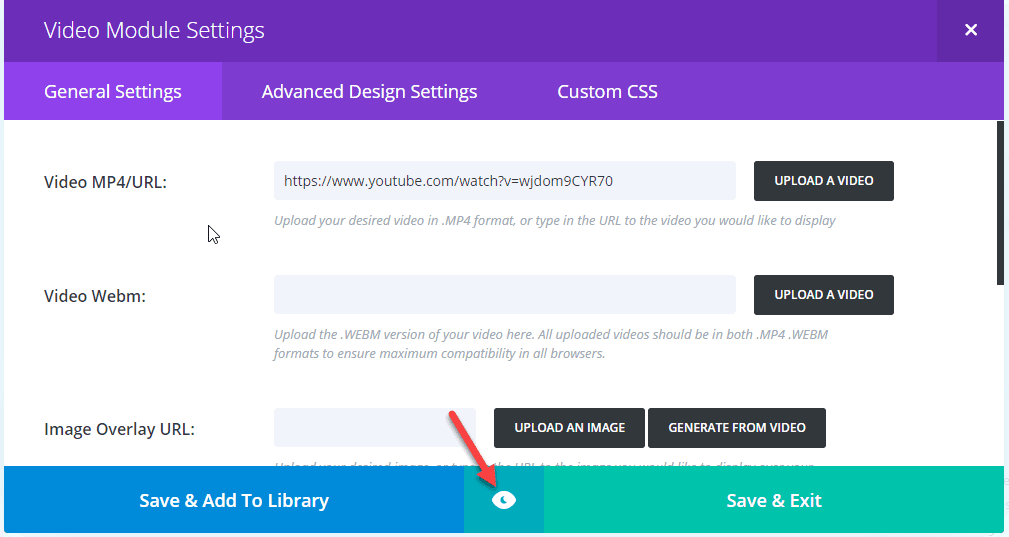
You click on the eye icon to see how the module is displayed instead of switching to the home screen.
In particular, you can save customized modules as templates for later use through ” Save & Add to Library”
Divi Visual Builder
Recently, Elegant Theme has released Divi 3.0 version. Divi 3.0 marks an unprecedented change.
And the biggest change is a new build form: Visual Builder.
Previously, Divi Builder’s website design was only done in the back-end. If you want to see if the interface is ok, you have to use the traditional Preview function. Switching back and forth obviously takes time.
Visual Builder takes the idea of WYSIWYG Editor. You design the website directly from the front-end. You can immediately see the changes without switching screens as before.
Price
At present, Elegant Themes gives you 2 options as below. Especially Elegant Theme has a 30-day refund policy. So signing up for a membership here is risk-free.

Have you used Divi before? Or are you using it? Let me know your experience with Divi in the comments section below?


