


What are Widgets?
As you can see, widgets are small blocks on your Website. They perform specific functions. Widgets show up on the sidebar or on the left or right side of all WordPress pages.
By default, WordPress already provides a number of Widgets. But the number of Widgets will increase depending on the theme or plugin you install.
Using widgets
To use Widgets, go to Appearance -> Customize or Appearance -> Widgets.
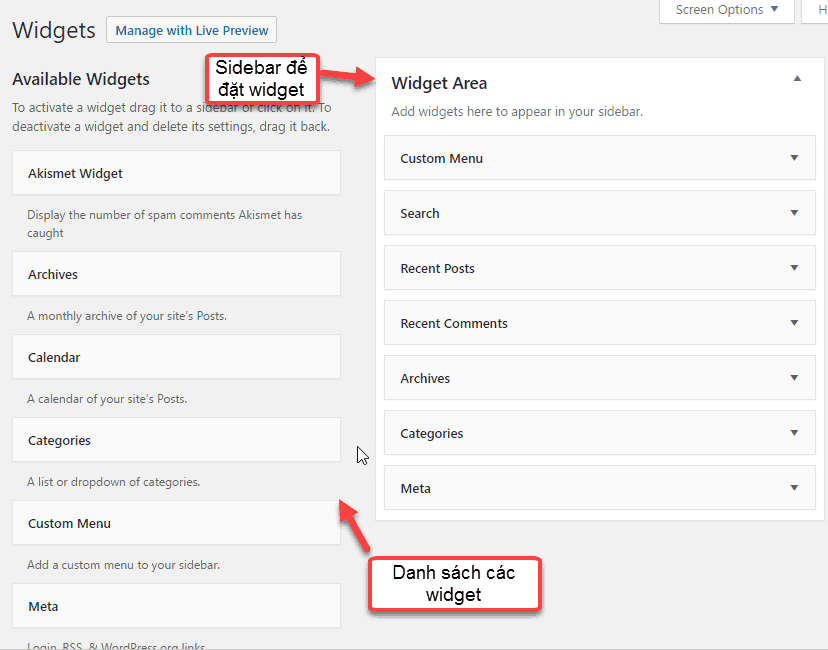
Go to Appearance -> Widgets
On the left hand side is a list of widgets that you can use. On the right hand side are sidebars that you can place widgets on.
The number of widgets depends on the theme you install. To know the functionality of the Widget, you should read the description of the widget.
To use the widget, simply drag the Widget onto the Sidebar you want to display. Alternatively, click on Widget, select Sidebar and click Add Widget.

Drag the Widget to the Sidebar

After adding a Widget, you can customize the settings for each Widget to display as you want. After editing, remember to Save to save the settings
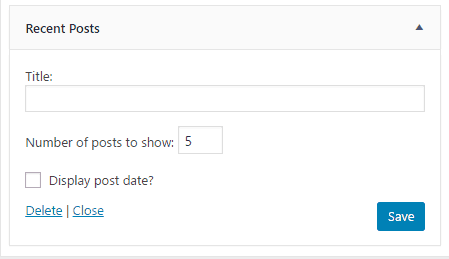
Setting up Recent Posts
Note : you can arrange Widget order by drag and drop.
If you don’t want to use the widget, just drag it back to the widget list on the left. Another way you can drag to the Inactive Widget area. This way you still keep the settings you applied to that widget. Therefore, when you want to use it, you pull it back to the Sidebar without having to set up any more

As always if you have any problems, leave a comment below.


