


Theme Junkie is the best priced paid theme provider in the WordPress Theme market. You can see details at my Theme Junkie discount code article .
Or you can buy the theme at the cheap Theme Junkie here .
Although the theme price here is quite cheap, the quality is very good.
Most themes have detailed installation instructions.
But to help those who are new to WordPress, I provide more instructions to install the Vietnamese version.
Specifically, I will guide you to install the TrueReview theme . This theme is suitable for magazine and news websites. Its strong point is the integrated review system and discount code (cooupon).
No more lengthy. I will go into the details of the installation process.
Contents
Install True Review theme
First you download the theme from the provider’s website. Then you install the theme by uploading the theme as I guide in this article .
To view the theme’s documentation, do the following:
After activating the theme, you go to Theme -> Customizer , this is also the place to customize the theme (Theme Junkie does not have its own panel, but the theme customizer is always integrated into the WordPress Customizer). Here you will see a link to the theme’s documentation page.

Recommended plugin settings
To take full advantage of the theme’s features, you need to install the plugins that the theme recommends.
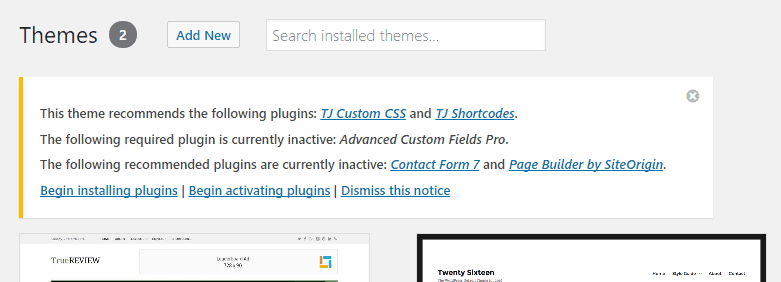
Here are the details of the recommended plugins:
Advanced Custom Fields Pro
You should install this plugin if you want to have a review feature or a discount code for articles
Page Builder by Site Origin
You should install the plugin because it allows building homepage with drag and drop feature. Without installing this plugin you cannot have the same look and feel as the homepage of the demo theme site.
Contact Form 7
Contact form creation plugin. You optionally install this plugin.
TJ Shortcode
If you need some content type like tab and button content then install. This plugin is not very important. If you like it, install it. But maybe if you need these kind of features, installing the ultimate shortcode will have more features.
TJ Custom CSS
If you need to add CSS to your website, you should use this plugin. You optionally install this plugin. Personally, I like to manually edit the CSS in the style.css file in the child theme. Because I don’t want to install too many plugins on one website.
TJ Team Content
Added “Team” post style to display your team members. No installation is required if your site does not need this feature.
How to install the plugin, you refer to the instructions in this article . The theme itself has a link “ Begin installing plugins ” at the top of the admin page. Click and follow the instructions to install the plugin you want.
Demo data settings
Theme Junkie provides demo data for all themes. As such, you can easily set up your website just like the demo page you see on Theme Junkie’s website.
Here are the steps you need to take to install demo data
Download the XML file containing the demo data (you can find it on the Theme Junkie website when accessing with your account or some themes are available in the readme folder when you extract the source file of the theme). For TrueReview, you can find the dummy-data.xml file available in the readme folder.
Go to WordPress Dashboard and navigate to Tools -> Import -> WordPress
Install the WordPress Import plugin if you don’t already have it installed.
Upload the dummy-data.xml file and click the “ Upload file and import ” button to continue.

On the next screen, enter a new username for each author or assign an existing author.
Check the “ Download and import file attachments ” option if you want to use the images in the demo file.
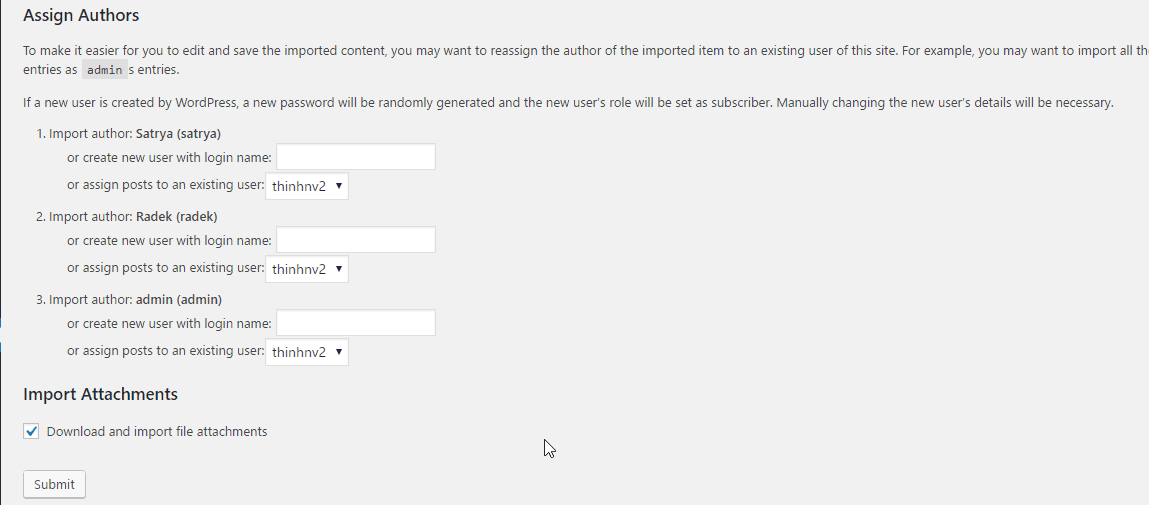
The process of importing demo data is a bit long. You need to be patient not to close the screen to avoid affecting the import process.
There are 2 important points you need to know about the demo file
- The XML file only imports data, you have to manually configure the Menu, Widget, customize the Theme Options manually if you want to look like the demo page.
- Some themes provide Widget Content such as TrueReview theme. To use Widget Content you install the Widget Imported & Exporter plugin .
Create Home page like Demo page
This method applies when the website already has articles before switching to the TrueReview theme. So you don’t want to import the demo as above.
The TrueReview theme has pre-designed a layout for the homepage using Page Builder by Site Origin. Make sure you have this plugin installed before you start.
First, you create a new page. On this screen, click on Page Builder.

Next, click on the built-in layout of the TrueReview theme.

In the popup that pops up, click the Insert button . Select Replace Current . You will be asked Are you sure? Click to download the layout for the homepage.
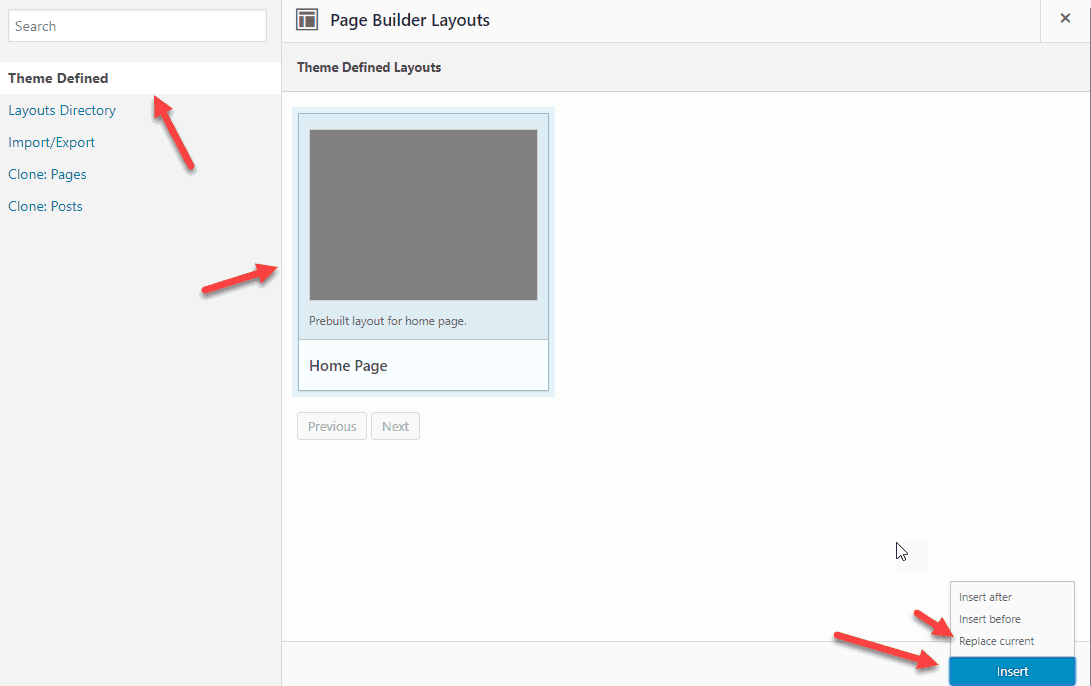
Now the layout for the homepage has loaded. You just need to edit the layout, choose the category for the widgets to your liking. Once done, publish this page and set up Homepage as instructed below.

Menu Configuration
Go to Appearance -> Menus -> Manage Locations . Select “ Top ” next to “ Primary Location ” and select “ Secondary ” next to “ Secondary Location ”
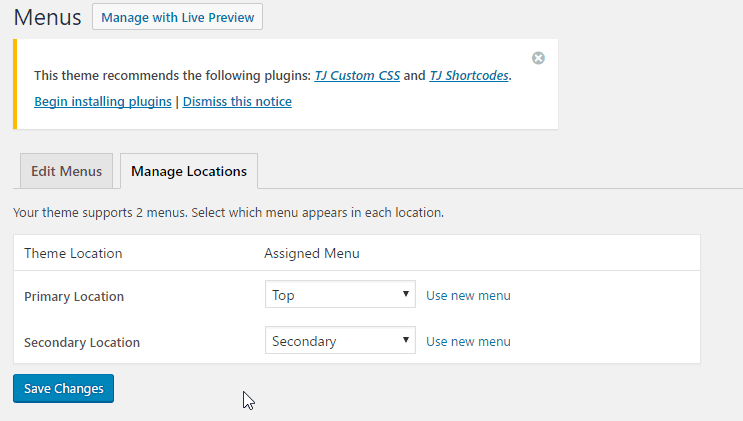
Go to Edit Menus on the same page, select “ Secondary Navigation ” from the menu to edit and click Select
Find the Categories menu and click on it to expand the menu options. Check the option Megas Menus ?, then select Three Columns under Mega Menu Columns

Find the Posts and Styles menu , click on it to expand the menu options. Check Mega Menus ?, then select Two Columns under Mega Menu Columns
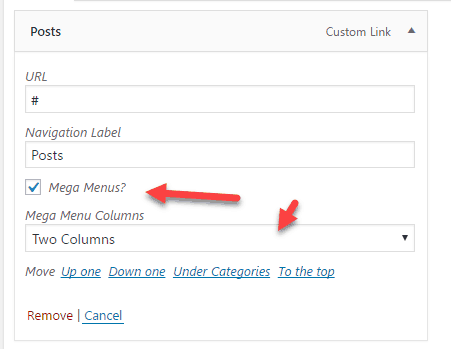
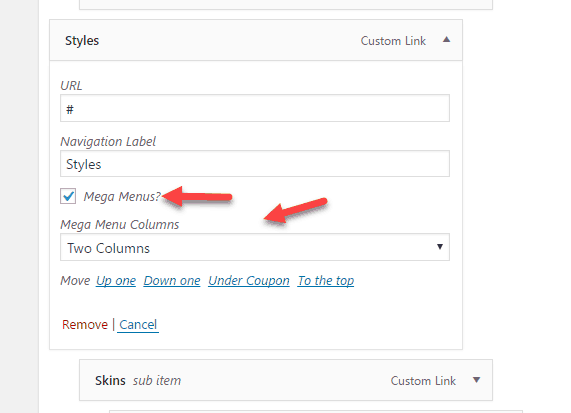
Click Save Menu to save the settings
Setting up the Home page
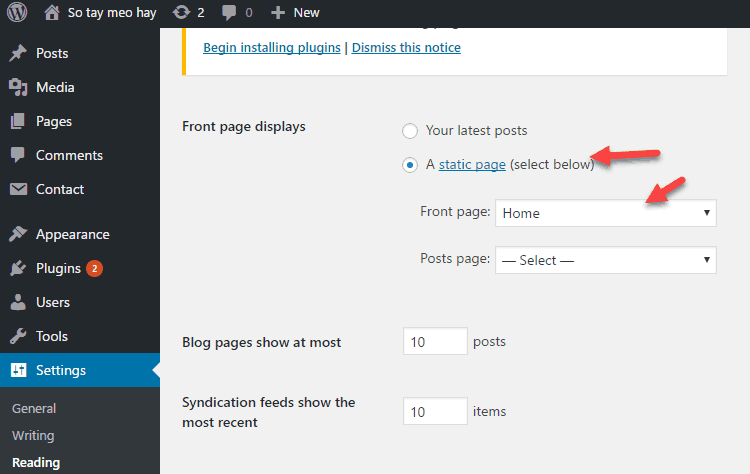
Go to Settings -> Reading
Select A static page next to Front page displays
Select Home next to Front page :
Before going to the homepage to check, you should note:
Remember to delete the default Hello Word post. If the Home page blocks are not the same as the demo page, you can go to Pages -> All Pages , edit the Home page again. This part, you only need to play a little bit to know how to use it.
At this point, you already have a website that looks like a demo site. The rest you can read more English documentation to know how to customize the theme.
As for Vietnameseizing the Theme, you should use the Loco Translate plugin instead of PoEdit as the documentation.
Epilogue
Above, I showed you how to install a theme in the Theme Junkie set. In my opinion, the documentation of Theme Junkie is complete and detailed.
Theme Junkie itself is not difficult to use. All customizations are already built into the WordPress Customizer. So you can see your edits right away.
If you have difficulty using the theme at Theme Junkie, please leave a comment below .


