


In a previous article, I showed you how to optimize URLs for Woocomerce.
As you know by default in Woocommerce the product category page will have the word product-category in the URL. For example, the clothing product category page would look like this http://.net/product-category/clothing/ .
The product page will have the word product in the link. An example product page for a garment would look like this: http://.net/product/classic-v-neck-tee/
Previously, if you wanted to remove product-category and product to make the URL shorter and more SEO-friendly, you had to intervene in the code.
This is quite inconvenient, especially for you who are afraid to touch the code.
Luckily, on the WordPress Repository there is a new plugin that solves this problem. It is WooCommerce Permalinks Manager .
How to delete product, product-category with WooCommerce Permalinks Manager
First you install and activate WooCommerce Permalinks Manager.
You will see a new section called Permalink Manager in the sidebar. Clicking on it will take you to the static path configuration page as below:
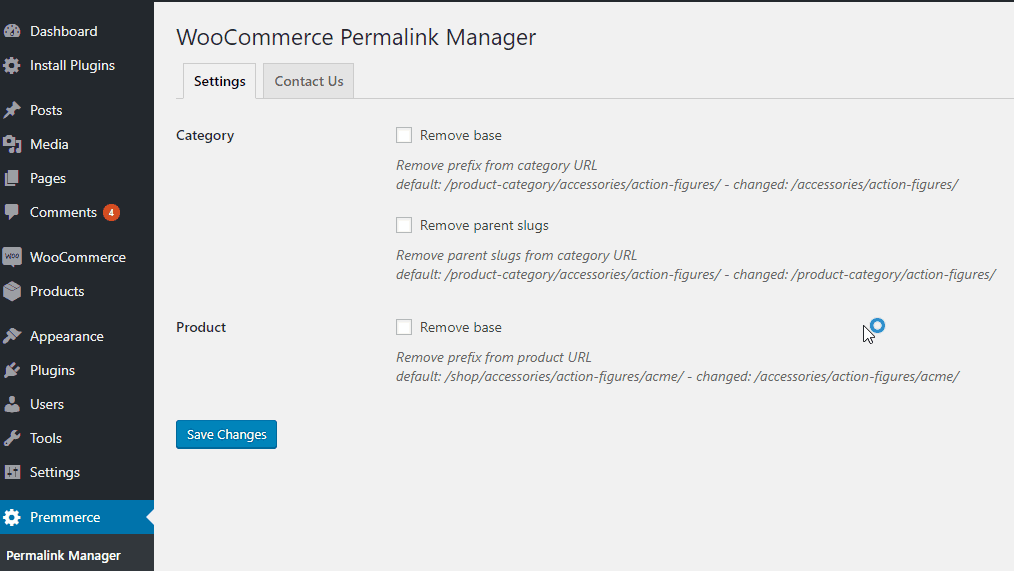
This configuration section is quite easy to understand. But I’ll explain a bit more in case you’re still confused.
Woocomerce Permalink Manager allows you to customize the URL for the product category page and product page.
For Category you will have 2 path options. So you will have 3 ways to create custom category page.
If you check Remove base , you will remove the word product-category from the category page URL.
For example:
Before selecting Remove base: http://.net/product-category/clothing/
After selecting the option: http://.net/clothing/
If you choose Remove Parent Slugs . This applies to subcategories. At this time, the parent category name will be removed.
For example, I have a female category showing women’s clothing. This category in the parent clothing category represents clothing in general.
So the female page will have the following form: http://.net/product-category/clothing/female/
After selecting Remove Parent Slugs : http://.net/product-category/female/ . Clothing will be removed.
If you choose both Remove base and Remove Parent Slugs , the path is: http://.net/female/
For Product you will have a Remove base option . Selecting this option will remove the product from the URL.
Before the change: http://.net/product/classic-v-neck-tee/
After the change: http://.net/classic-v-neck-tee/
Remember to click the Save Changes button every time you make a change.
Note : if your website has been indexed and has stable traffic, you need to perform 301 redirects to avoid 404 errors that affect the SEO value of your website.
That is all.
You just learned a plugin that makes it easy to optimize static URLs in Woocommerce.
If you know of a better plugin, leave a comment below.


